For office & home workers
Back pain from sitting at a desk
If your back is fine at 9am and grumbling by 3pm, the culprit is not your spine failing. It is hours of a posture your body was never built to hold, whether you're in an office or working from the kitchen table.
4.8/5from 2,841 UK customers
Written by The Orevive UK care teamLast reviewed August 2026How we write this, and what is not medical advice
The short answer
Sitting for long stretches loads the lower back discs more than standing, and a poorly set-up chair, monitor or laptop makes it worse. Regular movement breaks ("movement snacks"), a proper DSE-style setup, and 15 minutes of heat and kneading in the evening are what most desk-bound customers tell us actually breaks the cycle — the Orevive SpineEase does this from £79.95 with tracked UK delivery.
What sitting actually does to your back
Seated, the lumbar discs carry more load than they do standing, particularly if you lean forward towards a screen. The hip flexors shorten from being folded for hours, the glutes largely switch off, and the deep spinal stabilising muscles stop doing much work because the chair is doing it for them. Stand up after three or four hours of that and the whole system has to reactivate in a hurry, which is often exactly when people notice the twinge or stiffness.
Office desks versus working from home
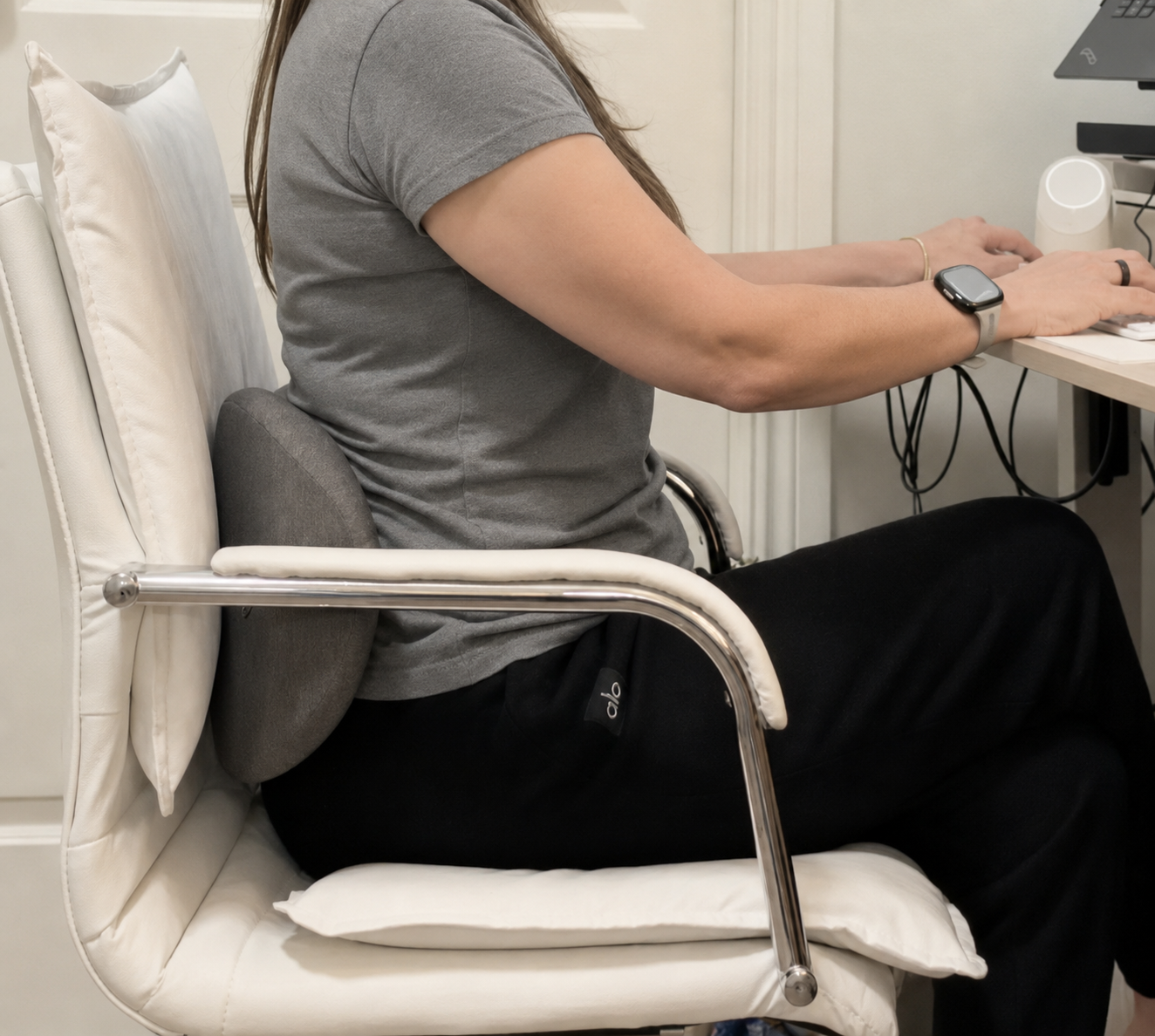
It's a common assumption that an office desk is worse than working from home, but for many people the opposite is true. Office desks and chairs are at least designed with some ergonomic thought, whereas a laptop balanced on a kitchen table or perched on a sofa arm often has no adjustable chair height, no proper monitor height and no lumbar support at all. If you split your week between the two, it's worth applying the same standards to your home setup that you would expect at a desk in the office.
DSE assessments — and how to ask for one
If you're a UK employee who regularly uses a computer as a significant part of your job, you're entitled to a Display Screen Equipment (DSE) workstation assessment under health and safety regulations, whether you're office-based or working from home. This typically covers chair adjustment, monitor height and distance, keyboard and mouse position, and lighting. If you haven't had one, or your setup has changed since your last one, it's reasonable to ask your manager or HR for a fresh assessment — it costs the business nothing and often flags an easy fix that's been causing weeks of discomfort.
Getting the chair and desk right
- Hips slightly higher than knees, feet flat on the floor or on a footrest
- Lumbar support sitting at belt height — a rolled towel works well if your chair has none
- Armrests set so your shoulders can relax down, not hunch up
- Screen top roughly at eye level, an arm's length away, so you're not leaning forward or craning down
- Keyboard and mouse close enough that your elbows stay near your sides
Movement snacks: short breaks that actually add up
"Movement snacks" — brief bursts of movement scattered through the day — tend to help more than one long walk or stretch session. The idea is simple: interrupt sustained sitting often enough that no single position gets held long enough to cause trouble.
- Stand up for at least 60 seconds every 30 minutes, even just to refill a water glass
- Take phone calls standing or walking rather than seated wherever possible
- Set a recurring reminder if your job makes it easy to lose track of time at a screen
- Use the walk to the printer, kettle or front door as a deliberate posture reset rather than rushing it
A five-minute daily routine
- Hip flexor lunge stretch, 30 seconds each side
- Glute bridges, 10 slow repetitions
- Cat–cow through the spine, 10 rounds
- Standing back extension, 5 gentle repetitions, hands on hips
Doing this once at lunchtime and once at the end of the day gives your back two proper resets rather than none.
Order the official Orevive SpineEase
Tracked UK delivery, 30 days to change your mind, and a manufacturer warranty.
£79.95single unit · 2x Orevive SpineEase £143.90
See bundles and orderThe evening reset that breaks the cycle
Posture fixes stop the problem getting worse; they rarely undo tension that's already built up by the time you close the laptop. A 15-minute session with heat and kneading across the lower back after work is what most of our desk-bound customers describe as the thing that finally broke the daily cycle of stiffness. Doing it on the sofa while you'd be scrolling anyway means it costs no extra time in an already busy evening.
If your discomfort sits more across the shoulders and upper back than the lower back, our upper back and shoulder pain guide covers that pattern specifically. And if you also spend time behind the wheel commuting, the guide for drivers has seat setup advice worth adding to your desk changes.
When desk pain needs more than a setup fix
See a GP or physiotherapist if
- Pain persists or worsens despite proper chair, desk and movement changes for a few weeks
- Pain radiates down one leg with numbness, tingling or weakness
- You have unexplained weight loss, fever, or pain that wakes you at night
- You experience numbness around the groin or any loss of bladder or bowel control — seek urgent care
Tracked UK delivery, dispatched from a UK warehouse
30-day money-back guarantee, no restocking fee
manufacturer warranty and UK-based support
Official store — genuine unit, not a marketplace copy
Safety, contraindications and when to see a GP
- Do not use if you have a pacemaker or any implanted electronic device
- Do not use during pregnancy, over broken skin, or on numb areas
- Speak to your GP or physiotherapist first after spinal surgery or a recent injury
- Seek urgent care for numbness around the groin, loss of bladder or bowel control, weakness in both legs, unexplained weight loss or fever with back pain
Questions people ask us about this
Is standing all day better than sitting all day?
Not necessarily — standing still for hours has its own downsides. Alternating between sitting, standing and moving through the day, rather than sticking rigidly to one posture, tends to work best.
Am I entitled to a proper chair for working from home?
Many UK employers provide a DSE assessment and reasonable equipment for home workers who use a computer regularly for their job. It's worth asking your employer directly, as policies vary by company.
How often should I get up from my desk?
A brief break of at least a minute every 30 minutes is a sensible target for most people, on top of a proper walk at lunchtime.
Will a standing desk fix my back pain?
It can help by breaking up long sitting periods, but standing with poor posture for hours causes its own strain. The bigger win is usually alternating positions and taking regular movement breaks.
Can a lumbar cushion really help?
Yes, filling the natural curve of your lower back at belt height reduces slouching and the load on the lumbar discs, and it's one of the cheapest fixes available.
How does the SpineEase fit into a desk-pain routine?
It's best used as the evening step — after you've addressed chair, monitor and movement habits — to ease the muscular tension that's built up through the day. Fifteen minutes with heat and kneading on the sofa is enough for most people.
Sources and further reading
We link to NHS and other public guidance so you can check anything on this page for yourself. Orevive SpineEase is a wellness device, not a medical treatment.
Keep reading
Give your back a proper end-of-day reset
Order the official Orevive SpineEase with tracked UK delivery and 30 days to change your mind.
30-day money-back guarantee · Secure Shopify checkout · Tracked UK delivery
Compare all three bundles first